A(nother) brief history Link to heading
In 2024, we presented the Grand scheme of managing Gogs infrastructure on DigitalOcean with Pulumi, where we fully migrated the entire lifecycle of Gogs infrastructure onto Pulumi as the chosen Infrastructure as Code (IaC) provider.
However, while all infrastructure resources are managed via IaC, we still have to hand roll every service we own, whose configuration and state cannot be easily persistent and managed in a Git repository. This year, we upgraded everything onto DigitalOcean’s Kubernetes (DOKS) platform, unlocking more streamlined service management, in a “modern” way.
The (upgraded) grand scheme Link to heading
As usual, let’s present you the most exciting and attracting part of an infrastructure setup, the (upgraded) architecture diagram!
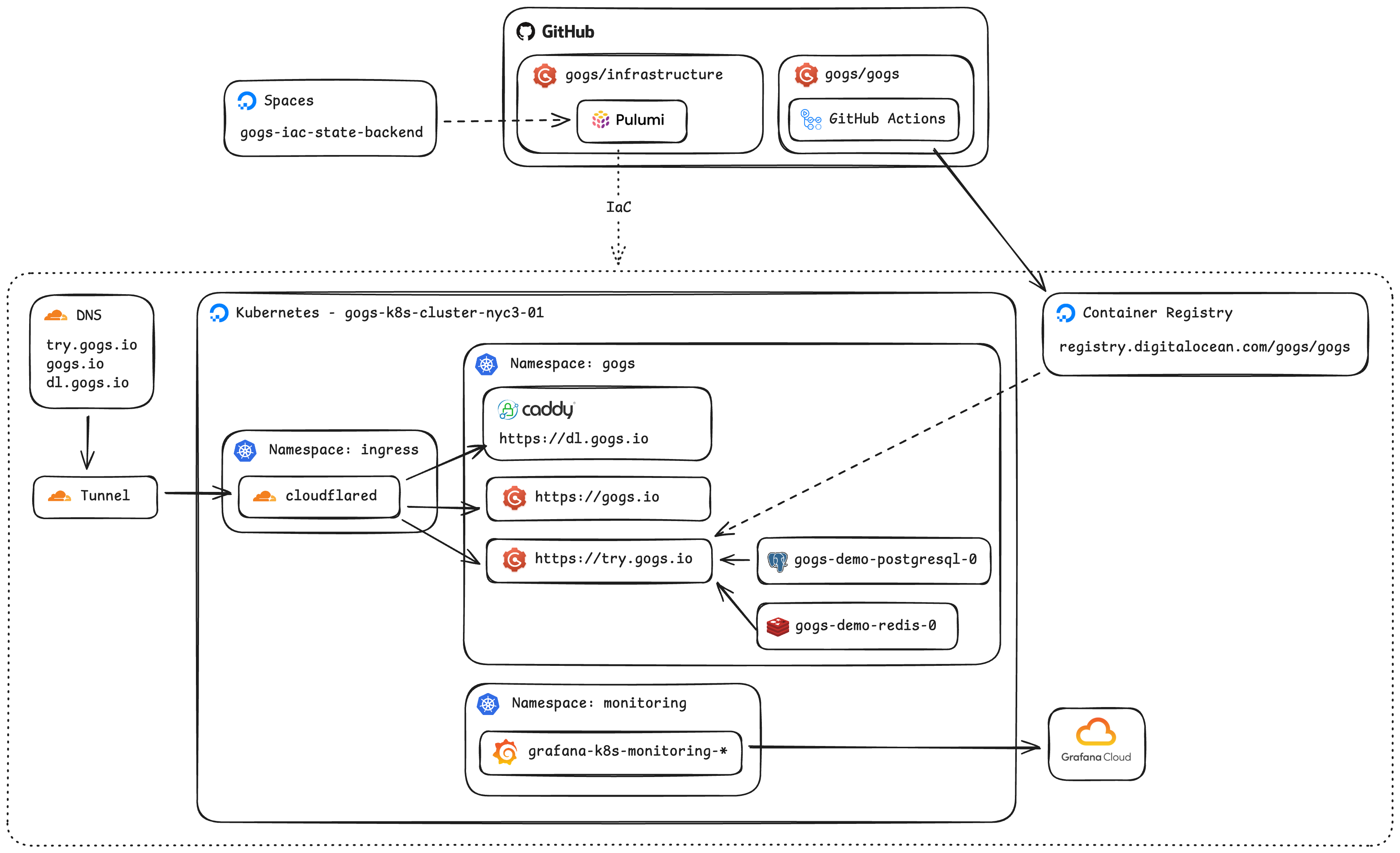
If you compare the updated version with the one from 2024, arguably, you might feel like there are fewer moving parts. That feeling is correct because many things are simply managed via Kubernetes controllers as native resources.
I have to say, though, it’s not a straightforward journey to implement this simpler architecture. Follow along!
Unaffordable ingress Link to heading
Adding a deployment is simple, type up the image name, mount the configuration, and you think it’s done. Oh, yep, it needs a public IP address so people can access it via a domain name. What’s the deal? Just add a load balancer for the deployment, piece of cake.
No no, not for the cost on DOKS! At my previous job, we use GKS, where load balancers are essentially free. In the case of DOKS, because everything you interact in it is actually built on top of other DigitalOcean resource types. Yep, a cluster node is a Droplet, so does a load balancer. To my surprise, adding a single load balancer to a single deployment, spins up a $15 Droplet! I mean, makes total sense for DigitalOcean, a Droplet does come with a stable public IP address, logically dedicated CPU, etc., but for a price I cannot afford. Yes yes yes, we are being sponsored by DigitalOcean’s Open Source Credits program, but we want to respectful for the credits granted to us.
What now? Should we just grab the public IP address of the node which the pod is running on? That’s super brittle, not only because pods will be moved around indeterministically, but also nodes will be rotated during a cluster upgrade.
Luckily, we found something that works for us, the Cloudflare Tunnel. The daemon, cloudflared, establishes outbound-only connections to create reverse-tunnels to Cloudflare’s edge nodes, similar to ngrok but available on Cloudflare’s free tier. Now, all we need to do is to change our DNS records to be CNAME of the designated tunnel domain.
Finally, we configure routing rules for the tunnel:
_, err = cloudflare.NewZeroTrustTunnelCloudflaredConfig(
    ctx,
    "cloudflared-gogs-k8s-cluster-nyc3-01-config",
    &cloudflare.ZeroTrustTunnelCloudflaredConfigArgs{
        AccountId: static.CloudflareAccountID,
        TunnelId:  tunnel.ID(),
        Config: &cloudflare.ZeroTrustTunnelCloudflaredConfigConfigArgs{
            IngressRules: cloudflare.ZeroTrustTunnelCloudflaredConfigConfigIngressRuleArray{
                &cloudflare.ZeroTrustTunnelCloudflaredConfigConfigIngressRuleArgs{
                    Hostname: pulumi.String("try.gogs.io"),
                    Service:  pulumi.String("http://gogs-demo.gogs.svc.cluster.local:80"),
                },
                &cloudflare.ZeroTrustTunnelCloudflaredConfigConfigIngressRuleArgs{
                    Hostname: pulumi.String("dl.gogs.io"),
                    Service:  pulumi.String("http://dl-gogs-io.gogs.svc.cluster.local:80"),
                },
                &cloudflare.ZeroTrustTunnelCloudflaredConfigConfigIngressRuleArgs{
                    Hostname: pulumi.String("gogs.io"),
                    Service:  pulumi.String("http://gogs-io.gogs.svc.cluster.local:80"),
                },
                &cloudflare.ZeroTrustTunnelCloudflaredConfigConfigIngressRuleArgs{
                    Service: pulumi.String("http_status:404"),
                },
            },
        },
    },
)
We love Cloudflare!!!
Connection-limited managed databases Link to heading
Initially, we thought about leaving databases (PostgreSQL and Redis) managed by DigitalOcean as-is since they have been running fine. However, as with any managed database offering, the connection limit is a pain-in-the-ass unless we are paying for some sort of premium tier. It was too low that we had to tune Gogs with a much lower connection pool size.
Anyway, it was quite straightforward to deploy a PostgreSQL (for demo site, non-production) and Redis in the DOKS. Looked into CNPG, but decided an overkill for now.
Ever-drifting drift detection Link to heading
One big thing that was missing from the 2024 version is the drift detection. Given that we are persisting all states in the IaC fashion, not having drift detection is like flying on autopilot with no instruments.
Supposed to be easy, just do pulumi preview --stack default --diff --non-interactive --expect-no-changes in the CI, no?
It cost us quite some hair and ChatGPT has been hallucinating quite badly on anything Kubernetes. The problem is that, the kubeconfig got stored in the Pulumi state, would expire in 7 days because that’s just how long the credentials are valid for any DOKS cluster. Thus the above command would initially work, and starts failing on day 8.
Luckily, it’s not impossible to work around that:
- name: Refresh Kubernetes provider kubeconfig
  run: |
    set -eox pipefail
    cd ${{ matrix.project }}
    # Pull down the new credentials to access the cluster
    pulumi refresh --stack default --target "urn:pulumi:default::${{ matrix.project }}::pulumi:providers:kubernetes::k8s-provider" --yes --non-interactive
    # Then actually store the new credentials to the stack state
    pulumi up --stack default --target "urn:pulumi:default::${{ matrix.project }}::pulumi:providers:kubernetes::k8s-provider" --yes --non-interactive
Before every drift detection, we ask Pulumi to force-refresh the kubeconfig, then do the usual checks.
Continuous deployment Link to heading
We are also able to upgrade our continuous deployment setup because the service lifecycle is managed by the Kubernetes controller, in a well-APIed way.
- Instead of invisible Cron jobs, with a up-to-5-minutes delay. A new version of demo site gets rolled out right after the Docker image is pushed to the DigitalOcean Container Registry.
deploy-demo: if: ${{ github.event_name == 'push' && github.ref == 'refs/heads/main' && github.repository == 'gogs/gogs' }} needs: buildx-next runs-on: ubuntu-latest permissions: contents: read steps: - name: Configure kubectl run: | mkdir -p ~/.kube echo "${KUBECONFIG}" | base64 -d > ~/.kube/config env: KUBECONFIG: ${{ secrets.DIGITALOCEAN_K8S_CLUSTER_KUBECONFIG }} - name: Restart gogs-demo deployment timeout-minutes: 5 run: | set -ex kubectl rollout restart deployment gogs-demo -n gogs kubectl rollout status deployment gogs-demo -n gogs - And because of that, we are able to clean up orphan images stored in the DigitalOcean Container Registry more aggressively. After every new image is built, we call the DigitalOcean API for a GC on the image repository.
- name: Run garbage collection
  run: |
    # --force: Required for CI to skip confirmation prompts
    # --include-untagged-manifests: Deletes unreferenced manifests to maximize space
    doctl registry garbage-collection start --force --include-untagged-manifests
Fun fact: We were able to create a service account token that expires in 100 years in DOKS! Our security friends might freak out but we probably never need to recreate it in our lifetime 😂
Monitoring Link to heading
The builtin monitoring of DOKS is pretty raw, so we installed agents from Grafana Cloud to have super-cool looking dashboards. The free tier is about right for our need.
One thing that really bothered us tho… DOKS was missing a standard metric kubelet_volume_stats for PVC! Now we need to figure out how to monitor PVC usages or just periodically check them manually, which is … kinda anti-pattern that we are already running everything on Kubernetes.
What’s next? Link to heading
Don’t be fooled by my complains, DOKS is overall, awesome and stable, haven’t run into any stability issues as we were using Droplet (that didn’t need a restart for 6 years). To be fair, there will always something surprising first-time using a new platform, that’s the reality of the world, we don’t give up eating just because of chocking hazard.
Future things to explore for the next upgrade:
- Wait for DOKS to fix their PVC usage metrics, or hand-roll a PVC exporter.
- Wait for DOKS to support
ReadWriteManyPVC storage class or hand-roll an adapter using their NFS offering. - Use a real secrets storage instead of storing them in Pulumi state?
- Add tests for IaC? LOL